Start the free trial
Choose your profession at smartysymbols.com/free-trial. Studio opens with a home page and resources for your work.
Schools and districts: group licences, training and purchase orders. Get a quote
Playground communication boardsBoardmaker alternative
Modern, inclusive symbols your learners can see themselves in, a Printing Center for anything you need on paper, and a Game Center that turns the same words into interactive practice. All in your browser, for $89 a year.

Print it or play itThe same symbols in printables and games.
60,000+ modern symbol images30,000+ inclusive symbols in color and outline, plus a growing high-contrast set
Printing Center + Game CenterPrintables and interactive activities from the same vocabulary
18,000+ ready-made activitiesShared by educators and therapists in the Community Activity Library
See it in action
What educators and therapists tell us they love most about Studio: how quickly they can make something, how clean it feels to use, and how modern the symbols look.

01
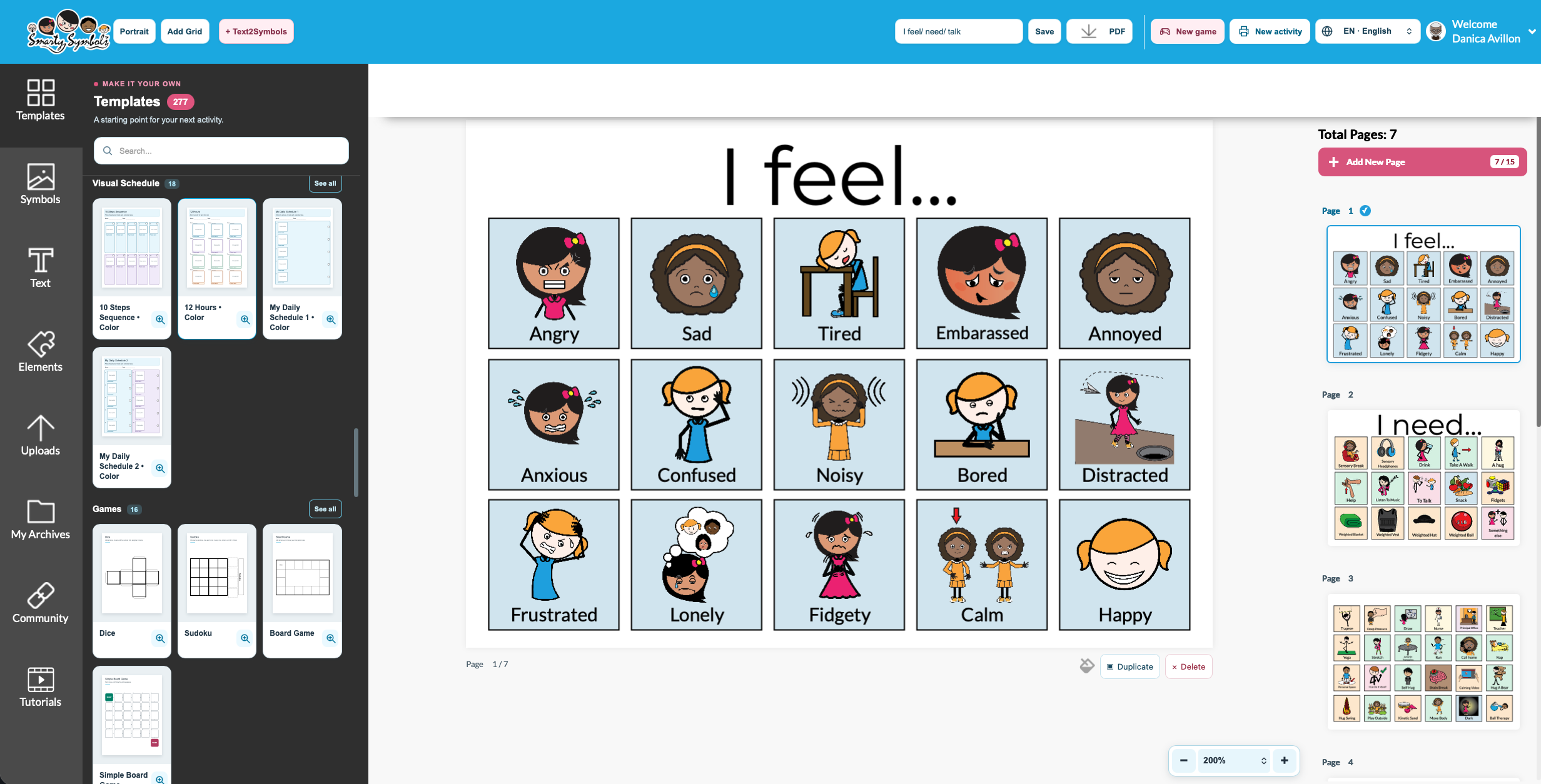
Pick a template, click a symbol into each spot and print. You can finish a first schedule or board in minutes, with no training and no design skills.

02
Everything sits in one bright, simple screen: templates, symbols, text, uploads and your saved projects. Build multi-page projects, reorder pages and come back to edit any time.

03
Smarty Symbols are drawn in one modern style, with Character of Choice: the same concept shown with different characters, so learners can see themselves in their materials. Every symbol comes in color and outline, with a growing high-contrast set.

04
The Game Center turns the same vocabulary into on-screen matching, sorting, sequencing, multiple-choice and yes/no activities, with optional audio. Learners play without an account of their own.

05
Find words by sound, position and number of syllables, then filter by category or related meaning. Building an articulation set takes minutes, not an afternoon.

Community Activity Library
Open an activity shared by another educator or therapist, personalize it for your learner and save it as your own project. You rarely start from a blank page.
Explore it free for 14 daysIn their words
Real materials educators made with Smarty Symbols, in their own words.

“With Smarty Symbols, you can make an unlimited amount of materials each month and the software is very user friendly. … There is no more sitting at my computer for hours, putting in my CD in order to make a visual schedule or anything else I need.”

“I love using @smartysymbols to create visuals that reflect my individual students and their needs.”

“Visual schedules for in home instruction! … @smartysymbols are the best!”
Why people look for an alternative
When teams compare symbol software, these are the things they ask for most. Here is how Studio handles each one.
No installs, no waiting on IT to push updates or activate licenses.
Studio runs in a web browser. Sign in and start; updates arrive automatically.
Work that's there when I sit down at a different computer.
Projects save to your Studio account, so you can open and edit them on any computer.
Not starting every material from a blank page.
Start from a template or one of 18,000+ ready-made activities, then personalize it.
Symbols that feel current and look like my students.
Modern Smarty Symbols with Character of Choice, in color, outline and high contrast.
One price that includes everything, without per-student tiers.
$89 per educator per year with every feature, and no student seats to buy.
Printables and on-screen practice that match.
The Printing Center and Game Center use the same symbols, so paper and screen look the same.
Side by side
What you get, what it costs and how it fits into your school's routines.
| Feature | Smarty Symbols Studio | Boardmaker 7 |
|---|---|---|
| Price for one person | $89 a year, or $10.99 a month. Every feature included, no tiers | Personal subscription $99 a year; Professional $199 a year; Standard one-time purchase $399 |
| Getting started | Works in any modern web browser. Nothing to install or activate | Editor app for Windows, Mac and Chromebook |
| Symbol style | Modern Smarty Symbols with Character of Choice: distinct characters for the same concept | PCS symbols in three drawing styles |
| Visual versions | Every symbol in color and outline, plus a growing high-contrast collection | PCS in color and black and white, plus a separate High Contrast library |
| Search | Words, meanings and categories, plus speech sound, sound position and syllables | Advanced search |
| Printables and games | Printing Center and Game Center (matching, sorting, sequencing, multiple choice, yes/no) in every plan | Editor and Student Center play activities with a subscription |
| Student data | No student logins. Staff make and share materials, so there's no student data to manage | Student accounts with Professional and Organization plans |
| School purchasing | $89 per staff account, volume and multi-year savings, $80.90 through BuyBoard #749-24 and TIPS, purchase orders welcome | Organization plan with volume pricing by quote |
Details for Boardmaker 7 come from Tobii Dynavox's public pages in October 2026 (purchase options, Boardmaker 7 Standard, PCS). Plans and prices change, so check their site for current details. Boardmaker and PCS are trademarks of Tobii Dynavox. Smarty Symbols is not affiliated with Tobii Dynavox.
Switching from Boardmaker
Start with the materials you use every week. If a student relies on a particular symbol set, plan the change with their SLP or AAC team.
Choose your profession at smartysymbols.com/free-trial. Studio opens with a home page and resources for your work.
Recreate your most-used schedules and boards from a template, or open a ready-made activity from the Community Activity Library and personalize it.
Download a print-ready PDF, then turn the same words into a Game Center activity for practice on screen.
Questions
More answers on our FAQ page and pricing page.
Studio has a free 14-day trial with every feature. After that it's $89 a year or $10.99 a month. Free printables are also available with a free Smarty Symbols account.
Studio works with its own projects rather than Boardmaker files. Most people rebuild their most-used materials from a Studio template or a Community Activity Library activity, which usually takes a few minutes each.
No. Staff create materials and print, download or share them, and Game Center activities run without a learner account. That means less student data to manage.
Yes. Build a quote with the quote tool and send your PO. We're on BuyBoard (contract #749-24) and TIPS.
Yes, with a commercial license. A regular subscription covers your own educational use.
See for yourself
Make a schedule, a board or a game you'll use tomorrow, then decide.